
Install
Install Agent HQ. Pick a way in.
The quickest way in is one command that downloads a verified release, for Linux and for Macs on Apple Silicon or Intel. Windows runs it in WSL2 or as HQ Lite. The server path installs signed releases and updates itself, and it is Linux only. An Android phone can host HQ as a developer preview.
Install script
curl -fsSL https://agent-hq.online/install.sh | bash
The quickest way in, with nothing to install first. It detects your platform (Linux x86_64 or ARM,
or a Mac on Apple Silicon or Intel), downloads the latest stable release, verifies its minisign signature and
SHA-256 checksum against the project key, and installs hq into
~/.local/bin and the web UI into ~/.local/share/agent-hq/web. After
hq start all the app is at http://localhost:5678. It checks signatures with
the minisign tool or with OpenSSL; on a Mac, install one of them first
(brew install minisign). Read the script before you run it: install.sh.
Then run hq install, add an API key with hq env (or
hq env set <provider>, which reads the key from standard input, for scripts and
agents), and run hq doctor, which sends your default model a one-token test request. On
a Mac, hq service install keeps the daemon running and starts it at login.
curl -fsSL https://agent-hq.online/install.sh | bash -s -- --channel main     # newest main build
curl -fsSL https://agent-hq.online/install.sh | bash -s -- --prefix ~/bin     # another bin directory
curl -fsSL https://agent-hq.online/install.sh | bash -s -- --no-web          # binary only
curl -fsSL https://agent-hq.online/install.sh | bash -s -- --web-only # web app onlyHomebrew
brew install CalvinMagezi/tap/agent-hq
For macOS on Apple Silicon or Intel, and Linux. The tap installs the signed stable release of hq
and upgrades with brew upgrade agent-hq. The formula is regenerated every six hours from
the signed release manifest, and its checksums are written only after the signature verifies. It
installs the binary only; the install script above also installs the web UI.
npx installer
npx agent-hq-cli
Needs Node 18.17 or newer, which stock Ubuntu 22.04 does not have; use the install script there. It
downloads the latest stable release for your platform, checks the minisign signature and the SHA-256
checksum against the project key, and installs hq into ~/.local/bin. On a
platform without a prebuilt binary it builds from source with cargo.
Then run hq install, add an API key with hq env, and check with hq doctor.
Docker
docker run -d --name hq --restart unless-stopped -p 127.0.0.1:5678:5678 -v hq-data:/data ghcr.io/calvinmagezi/hq
A multi-arch image (Linux x86_64 and ARM) assembled from the signed release, published to the GitHub
Container Registry. The server inside binds a public address, so HQ requires a web token: the first run
prints a link that carries it, once. The port is published on 127.0.0.1 only. Add
-e HQ_OPENROUTER_API_KEY=... (or another provider key) to give it a model. State lives in the
hq-data volume. Read the Docker guide for
the sandbox note, backups and Tailscale.
Then run docker logs hq and open the link it prints.
Windows
irm https://agent-hq.online/install.ps1 | iex
Two editions. In PowerShell, irm https://agent-hq.online/install.ps1 | iex looks at your
computer, recommends one and asks. Full HQ is the default wherever WSL2 works: HQ and its
coding agents run inside WSL2, which is a normal Ubuntu, and you open the web UI from your Windows browser at
http://localhost:5678. HQ Lite is for work computers that block WSL2 or
installers: one program in your user profile, no administrator rights, with the web app, tasks, notes and VS
Code over MCP, and no coding agents. Its download is signed with the HQ release key and checked first, but it
has no Windows code-signing certificate yet, so a computer that only allows approved programs may refuse it;
the installer says so and stops.
By hand, Full HQ is wsl --install -d Ubuntu, then the Linux install script above inside Ubuntu.
Install bubblewrap (sudo apt install bubblewrap) so agents run in their sandbox; Ubuntu 24.04
also needs user namespaces allowed.
A Windows PC can instead run the coding agents for an HQ on a server: install hq in WSL2, run
hq host join and pair it from the HQ with hq host add. The full steps are in
the Windows guide and the guide for adding a machine.
Linux and macOS
Build from source
You need git, a recent stable Rust toolchain and at least one LLM API key from OpenRouter, Anthropic or Google AI. Edition 2024 needs Rust 1.85 or newer, and CI pins 1.98.1. The web UI also needs bun.
Connect Telegram or Discord from the web app: Settings, then Chat apps, paste
the bot token and send the pairing code from your own account, so the bot knows who the owner is. From a
terminal, put the token in ~/.hq/config.yaml and run hq pair. The
README has the config keys.
Agent shell commands need a sandbox. On macOS that is sandbox-exec, which ships with the system.
On Linux install bubblewrap, or HQ refuses to run model-written bash.
Install Rust with rustup, if you do not have it.
Install Rustcurl --proto '=https' --tlsv1.2 -sSf https://sh.rustup.rs | shClone the repository.
Clonegit clone https://github.com/CalvinMagezi/hq.git cd hqOn Debian or Ubuntu, install the build dependencies first.
Linux build dependenciessudo apt install -y build-essential pkg-config perl libssl-devBuild the release binary. It is about 58 MB.
Buildcargo build --release -p hq-cliPut it on your PATH. Make sure
~/.local/binis on it.Install the binaryinstall -m 755 target/release/hq "$HOME/.local/bin/hq"Run first-run setup.
First runhq install # scaffold the vault, seed the soul, write config hq env # set LLM API keys interactively hq doctor # verify the setup hq chat # start an interactive sessionOptional: add the web UI.
--web-onlyinstalls the signed release build into~/.local/share/agent-hq/web/dist, which HQ finds from any directory;hq web --buildbuilds it from the checkout with bun.Web UI# the released UI, signed, no bun needed (any platform): curl -fsSL https://agent-hq.online/install.sh | bash -s -- --web-only # or build it from this checkout instead: hq web --build hq start all # API, WebSocket and the PWA on :5678Optional: connect an MCP client such as Claude Code.
MCPhq mcp install --target claude-code hq mcp status
Android 8 or newer, arm64 · developer preview
Host HQ on an Android phone
The Android app runs hq as a foreground service with the mobile profile: the daemon,
both chat relays and the web app, with a data saver for metered plans. It has no agent shell, because Android
has no sandbox HQ can use, so coding agents keep running on a laptop or server and the phone supervises them.
There is no published app yet: you build it, and installing it needs adb.
-
Build
hqfor the phone with the features the app needs.hq for Android# hq for the phone, with the pairing and tunnel features the app uses # (the recipe CI runs is .github/workflows/android.yml) cargo build -p hq-cli --profile release-small --target aarch64-linux-android --features tunnel,bridge --locked -
Build the APK. All four paths are required, and keep the signing key backed up: only an update signed with the same key keeps the phone's data.
APKcd apps/android ./gradlew :app:assembleDebug \ -Phq.bin=<hq aarch64-linux-android> -Phq.caddy=<caddy linux arm64> \ -Phq.web=<apps/hq-web/dist/client> -Phq.keystore=<your signing key> -
Install it over USB debugging. Always update with
-r; uninstalling deletes the vault.Installadb install -r app/build/outputs/apk/debug/app-debug.apk -
Push your model key the way the README shows (the app encrypts it under an Android Keystore key and wipes the plain copy), then switch from standby to the full daemon. Run the daemon on one machine at a time, or two of them answer the same bots.
Full HQ# hq starts in standby: the web app only. For the full daemon and relays: adb shell "run-as example.hq.spike sh -c 'echo active > files/mode'" adb shell "run-as example.hq.spike sh -c 'kill \$(pidof libhq.so)'" # the app restarts hq
Keep the phone on a charger and allow it to run in the background; the app's Keep running screen checks the settings it can. The Android README has the details, and the mobile edition lists what differs from a laptop or server.
Debian or Ubuntu, x86_64 or ARM
Server with signed releases
For an always-on instance on a Debian or Ubuntu VPS. The installer sets up a systemd timer that pulls
minisign-verified releases, swaps the binary, checks /health and rolls back if the check fails.
It runs from a checkout of the repository on the server, because it installs the unit files from there.
Server installs run on Ubuntu 22.04 or newer, on x86_64 or ARM.
- TimerEvery 10 min
- Verifyminisign and SHA-256
- SwapBy rename
- Health/health shows new sha
- Keep or roll backAlert on failure
-
Provision the box once from your machine. This installs Tailscale, Caddy, ufw and
gh, creates an unprivilegedhquser and writes a starter config with both chat relays disabled.<ssh-host>is an SSH alias for your server.Provisionssh <ssh-host> 'bash -s' < deploy/setup-vps.sh -
On the server, clone the repository (same commands as above).
Clonegit clone https://github.com/CalvinMagezi/hq.git cd hq -
Install bubblewrap, which the default sandbox mode needs, and the
minisigntool, which the installer uses to check the first download.Dependenciessudo apt install -y bubblewrap minisign -
Run the installer with the official release key from the repository,
release/minisign.pub. It creates the user and directories, installs the units, writes/etc/hq/update.confand the key, bootstraps the first binary, runs the first signature-verified update and enables the timer. It is safe to run again.Installsudo deploy/install.sh --repo CalvinMagezi/hq --channel stable --pubkey release/minisign.pub -
Day to day.
Updateshq update --check # exit 10 means an update is waiting hq update --apply --dry-run # verify the release, change nothing hq update --apply hq update --pin <version> --apply # exact version, downgrades allowed hq update --rollback # previous binary and web files
deploy/install.sh installs HQ only. Coding agents run on a machine that has them installed, paired
with hq host join; see the sessions docs. Personal agents such as
Hermes and OpenClaw are optional and set up the same way; see the personal agents
guide. Pick one deploy path per
host: the updater owns the binary and web files, so do not also build on the server. Full walkthrough:
deploy/README.md. To check a release by hand, see
verifying a release.
About ten minutes
One form on Hetzner
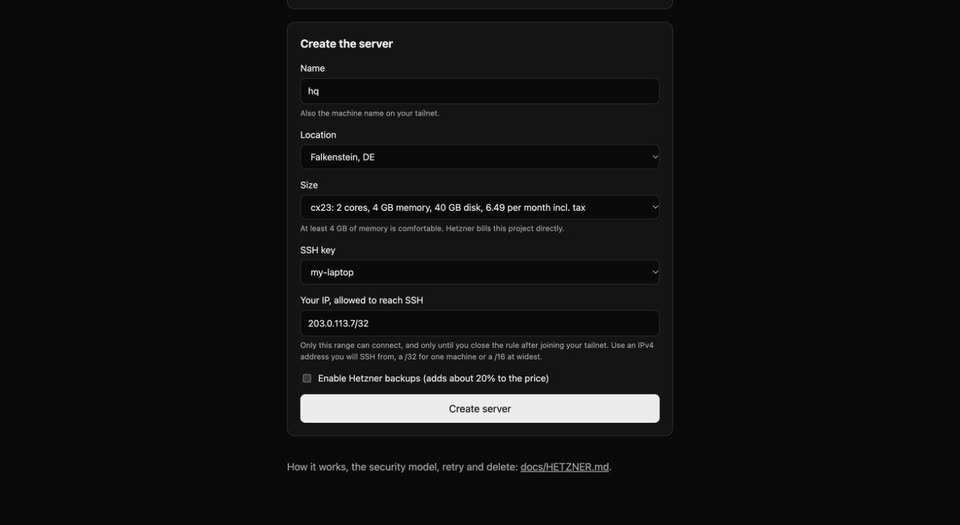
The quickest way to a private, always-on HQ. A form creates a server in your own Hetzner Cloud project that installs signed releases, updates itself and is reachable only from your tailnet. It takes about ten minutes, most of it waiting, and costs Hetzner's hourly price for the server: about 6.50 a month for a 4 GB machine.
You need a Hetzner account with a payment method, a free Tailscale account with MagicDNS and HTTPS certificates
turned on, an SSH key (ssh-keygen -t ed25519 makes one), and a model API key such as OpenRouter.
- 1
Make a token
In the Hetzner Cloud console create a project, then Security, API tokens, Generate. Choose Read & Write and copy it once.
- 2
Fill in the form
Open the deploy form, paste the token, and pick a name, a location, a size with at least 4 GB of memory, your SSH public key and your own IP address. Click Create server.
- 3
Wait 3 to 5 minutes
After Hetzner shows the server as running. It installs HQ by itself.
- 4
Join your tailnet
Run
ssh root@<server-ip> hq-join, open the Tailscale login link it prints and sign in. It then prints your HQ link. - 5
Open HQ
Open that link on a device on your tailnet, paste your model key on the first screen (what it does), and send a message. Treat the link like a password.
- 6
Close public SSH
Use the button on the form page once HQ opens. When you are done with the server, the same page deletes it with its firewall and key.
The server's setup data holds no secret and the admin token is generated on the server, so the form never sees it. More detail, troubleshooting and the security model: docs/HETZNER.md.
Optional
Remote web access over Tailscale
This puts the web UI on your tailnet over HTTPS, so your phone can reach it and the public internet cannot. HQ
stays on loopback, Caddy listens on 127.0.0.1:4749, and
tailscale serve terminates TLS. HTTPS certificates must be enabled for your
tailnet. Run these on the server, from the repository checkout. hq.example.ts.net stands for your
server's own MagicDNS name.
Join the tailnet.
Tailscale upsudo tailscale upAdd the loopback Caddy bridge.
Caddysudo cp deploy/Caddyfile.pwa /etc/caddy/Caddyfile.pwa echo "import Caddyfile.pwa" | sudo tee -a /etc/caddy/Caddyfile sudo caddy validate --config /etc/caddy/Caddyfile && sudo systemctl reload caddyServe it on an alternate HTTPS port. Port 443 is usually taken by a public Caddyfile.
Servesudo tailscale serve --bg --https=8443 http://127.0.0.1:4749 tailscale serve statusList every origin you open the UI from in
/opt/hq/config.yaml, and set a web token. Without the origin you get a 403 about an unrecognised Host header. Restart HQ afterwards.config.yamlweb_allowed_origins: - https://hq.example.ts.net:8443 web_auth_token: "<a long random value>"
To turn it off again, run this. Never publish /ws or /api on a public address.
sudo tailscale serve --https=8443 offKeeping it current
Updating and uninstalling
Each channel updates the way it installed. Your notes and config are never touched by an update.
hq update only manages servers set up with the server installer; on any other install it tells you
the right command.
Your vault and config live in ~/.vault and ~/.hq on a personal install. Keep or delete
them as you like; nothing here removes them.
Not available yet
These do not exist today. We list them so you do not go looking, and so you know they are not promised for any date.
- Code-signed Windows builds, and coding agents on native Windows (they need WSL2 today).
- A published Android app. Today you build the APK yourself, as a debug build.
- Proof that a sleeping, unplugged phone always answers in time. Keep a hosting phone on a charger.
- QR pairing in the standard downloads.
hq bridgeis built into the Android app only, for now. - A signed macOS desktop app. The Tauri app in the repo builds and runs, unsigned.
Install script or npx
Update by running the script again. Uninstall: rm ~/.local/bin/hq and rm -rf ~/.local/share/agent-hq.
Homebrew
brew upgrade agent-hq. Uninstall: brew uninstall agent-hq.
Docker
docker pull ghcr.io/calvinmagezi/hq, then recreate the container. Uninstall: docker rm -f hq; docker volume rm hq-data also deletes your data.
Server
It updates itself from signed releases every ten minutes. To remove it, back up /opt/hq/.vault first, then systemctl disable --now hq hq-update.timer and delete the unit files, /usr/local/bin/hq, /etc/hq and /opt/hq.