
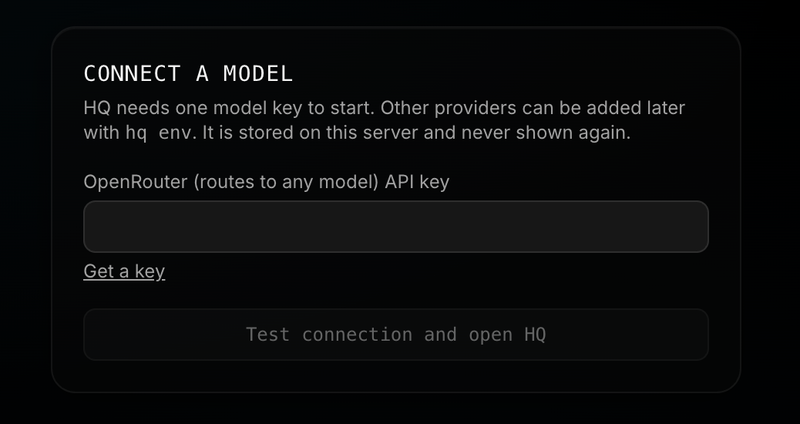
A new HQ server needs one model API key before it can chat. If you set HQ up on a server you cannot easily type into (the Hetzner deploy, a VPS you only reach through the browser), the web app asks for that key itself, so you never need a terminal for it.
When you see it
Open HQ in the browser the first time, using the sign-in link your setup printed. If the server has no model key yet, the app sends you to Connect a model (/setup). You see it once per page load, only when all of these are true:
- no model key exists in the config or in the usual provider environment variables (
OPENROUTER_API_KEY,ANTHROPIC_API_KEY,GOOGLE_AI_API_KEY,GEMINI_API_KEY); - the server has a web token, which every server set up from a sign-in link has;
- you are running a release that includes the screen (stable from
v0.9.1-main.99on).
What to do
-
Pick a provider and create a key for it:
- OpenRouter (https://openrouter.ai/keys): one key reaches many models. The default model is
openai/gpt-6-luna. - Anthropic (https://console.anthropic.com/settings/keys): Claude models directly. The default model is
anthropic/claude-haiku-5.5. - Google AI (https://aistudio.google.com/apikey): Gemini models directly. The default model is
google/gemini-2.5-flash.
The account needs a little credit. A spending cap or an expiry on the key is a sensible precaution.
- OpenRouter (https://openrouter.ai/keys): one key reaches many models. The default model is
-
Paste the key into the field and click Test connection and open HQ.
-
HQ opens the chat. Send a message to confirm it answers.
What the button does
- Tests the key. The server sends one tiny request (one output token, 15 second limit) to the chosen provider with your key. If the provider refuses it, you see the provider’s own message, for example
auth error (401): Unauthorized, and nothing is saved. - Saves it. On success the server writes the key to its config file (
/opt/hq/config.yamlon a server install,~/.hq/config.yamlotherwise, mode 600). It also sets the default model to that provider’s low-cost model (see above), but only if the config still has the stock default (relay) or a localollama/model. A model you chose on purpose is kept. Local-only mode is switched off so the key is used. - Needs no restart. HQ reads its config on every chat turn, so the next message uses the new key.
What protects the key
- The key is sent only to your own HQ server over your tailnet or HTTPS, and from there only to the chosen provider’s fixed address. It is never returned by the API, never written to logs, and scrubbed from any error text.
- The setup endpoints refuse to run on a server without a web token. They do not make an exception for requests that look local, because behind a proxy or
tailscale serveevery request looks local. - They refuse once any key exists (
409), so the screen cannot be used to swap keys later. Replace or add a key from Settings, Provider keys instead (see below), or withhq envon the server. - Like other changes from the web app, the requests need the
X-HQ-Clientheader, which a page on another site cannot add.
When it does not appear
- A key already exists. Open Settings, Provider keys. Replace or Add tests the new key the same way and saves it only if it works. It leaves the model choice alone, except that a first key ever moves a stock default onto that provider’s low-cost model, as setup does. A provider whose key comes from the server’s environment (
HQ_OPENROUTER_API_KEY,OPENROUTER_API_KEY,HQ_ANTHROPIC_API_KEY,ANTHROPIC_API_KEY,HQ_GOOGLE_AI_API_KEYorGEMINI_API_KEY) shows as set by the environment and is refused (409), because a config write could not override it. Change those where they are set and restart. Like setup, this needs a web token. - Local use without a web token. On
localhostwith no token the screen is unavailable by design (403: “first-run setup needs a web token”). Runhq env, orhq env set <provider>from a script or an agent (it reads the key from standard input or--from-env VAR), or add the key to~/.hq/config.yaml.hq doctorsends the default model a one-token test request and says whether it answered. - An older release. Servers that installed before the screen shipped have no
/setup. Update withhq update --apply, or follow the terminal route.
Problems and fixes
| What you see | Cause and fix |
|---|---|
auth error (401): Unauthorized |
The provider rejected the key. Check for a stray character, an expired key or a key from another service. |
rate limited or provider overloaded |
The provider is busy or the key hit its cap. Try again or raise the cap. |
the provider did not answer in time |
No answer within 15 seconds. Check that the server can reach the internet, then retry. |
that does not look like an API key |
The field is empty, longer than 512 characters or contains a space. Paste only the key. |
a model key is already configured (409) |
Someone, or an environment variable, already set a key. Reload the page. |
The page loads but every panel shows 401 |
The browser did not keep the sign-in token. Open the sign-in link again in a fresh tab. |
| Chat says no provider is available | The server runs an older release, from before Anthropic and Google keys in the config file reached the chat router. Update with hq update --apply, or use an OpenRouter key. |
Which models a direct key serves
A direct Anthropic key serves anthropic/claude-haiku-5.5 (the default), anthropic/claude-sonnet-5.5 and anthropic/claude-opus-5.5. A direct Google key serves google/gemini-2.5-flash (the default) and google/gemini-2.5-pro. Any other model id is not pinned to those keys: it goes to whichever configured provider accepts it, which is OpenRouter if you have a key for it. To use another Gemini model with a Google key, set the model to gemini/<model id>.
Using other providers
The screen offers the three providers above because their keys go straight into the config fields the chat router reads (openrouter_api_key, anthropic_api_key, google_ai_api_key). For DeepSeek, OpenAI, Groq, Cerebras, Kimi or local models, see Configuration in the README and the backends: section.