
This sets up a private, self-updating HQ on a Hetzner Cloud server. It never stores a secret in the server’s user-data, and the web UI is reachable only from your tailnet. The hosted form (apps/deploy, at https://deploy.agent-hq.online) and deploy/hetzner/hcloud.sh both use the same cloud-init.yaml, and a test keeps the form’s copy identical to the file.
Before you start
- A Hetzner Cloud account with a payment method. Nothing here is free: you pay Hetzner for the server by the hour. The form shows each size’s monthly price; a 4 GB x86 server was about 6.50 a month when this was written, which is about a cent an hour.
- A Tailscale account (the free plan is enough) with MagicDNS and HTTPS certificates turned on under DNS in its admin console. HQ is reachable only from your tailnet.
- An SSH key. If you have none, run
ssh-keygen -t ed25519and use the contents of~/.ssh/id_ed25519.pub. - A model API key, which you add after HQ opens. OpenRouter works with any model.
Quick start: the form
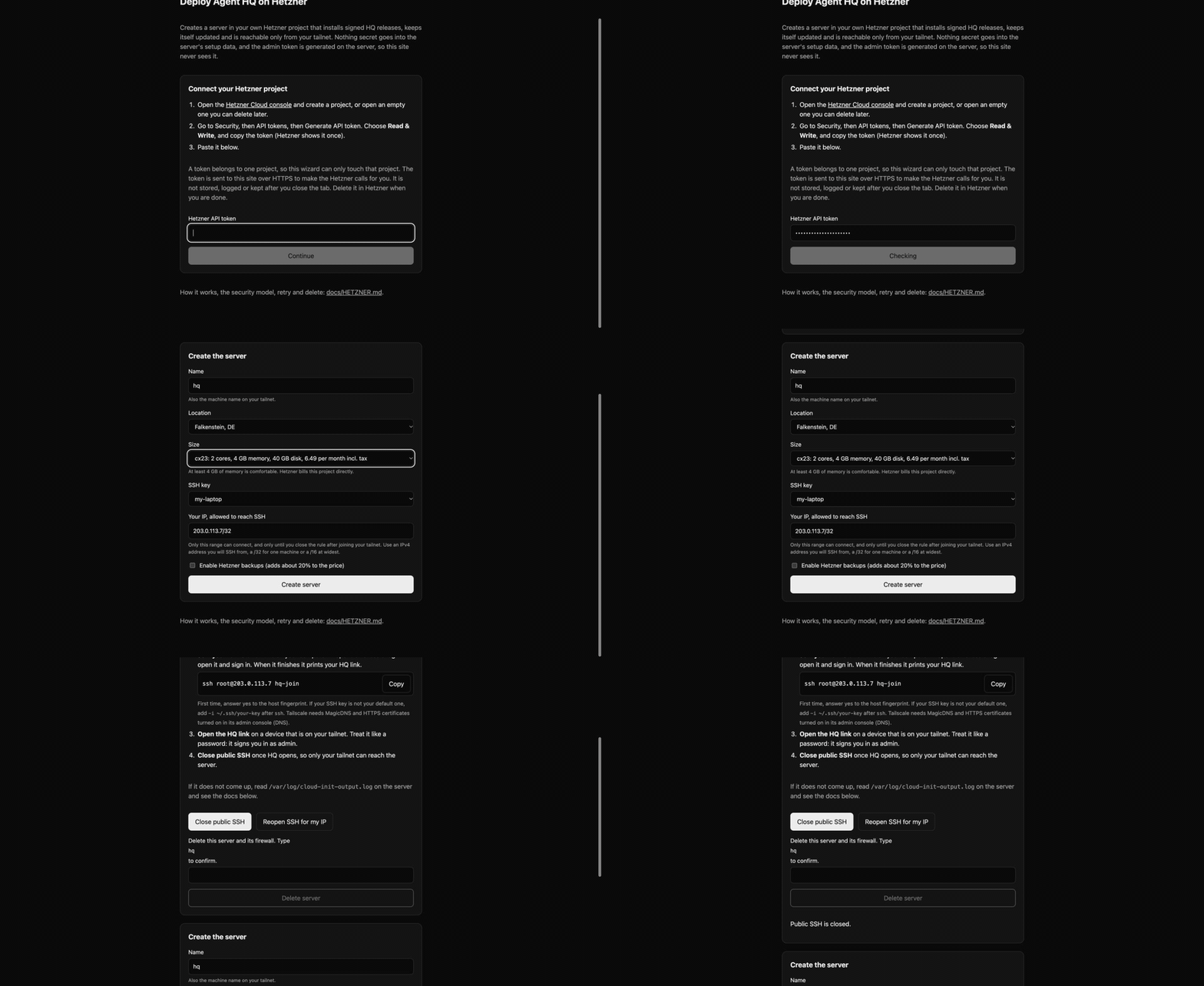
The recording uses sample data: a placeholder address and no real account.
- Create a Hetzner token. In the Hetzner Cloud console create a project (or open an empty one you can delete later). Go to Security, then API tokens, then Generate API token. Choose Read & Write and copy the token; Hetzner shows it once.
- Open https://deploy.agent-hq.online and paste the token. Pick a name, a location, a size with at least 4 GB of memory, your SSH key (paste the public key if it is new) and your own IP address as
x.x.x.x/32. Only that address can reach SSH. Click Create server. - Wait about 3 to 5 minutes after Hetzner shows the server as
running. The server installs HQ from signed releases by itself, and the page cannot see its progress because HQ is private to your tailnet. - Join your tailnet. On your computer run the command the page shows,
ssh root@<server-ip> hq-join. It prints a Tailscale login link: open it and sign in. When it finishes it prints your HQ link,https://hq.example.ts.net:8443/vault#token=.... Treat that link like a password, because it signs you in as admin. If you are setting HQ up for someone else, it prints the link inside a block you can forward as is; send them the owner guide first, since they need Tailscale ready before this step. - Open the HQ link on a device on your tailnet. HQ asks for a model key on first run; what that screen does and how to fix problems.
- Close public SSH with the button on the form page, once HQ opens. From then on only your tailnet reaches the server. If you ever lose the tailnet path, Reopen SSH for my IP brings it back.
When you are finished, type the server name into Delete server on the same page. It removes the server, its firewall and the SSH key it added. Then delete the Hetzner token (or the whole project) and remove the machine from your Tailscale admin page.
From the terminal
deploy/hetzner/hcloud.sh does step 2 with the hcloud CLI, using the same cloud-init as the form:
bash deploy/hetzner/hcloud.sh --name hq --ssh-key my-key --admin-cidr 203.0.113.7/32 \
    --type <server-type> --location <location> --repo <owner>/<repo>
Pick values with hcloud server-type list and hcloud location list. The commit you deploy must already be pushed. Then continue from step 3 above. What happens on the server:
- cloud-init downloads
bootstrap.shat a pinned commit, checks its sha256, and runs it. It installs HQ from signed releases, generates the web token and MCP key on the server, installs Tailscale without joining it, enablesufw, and restricts SSH to keys. Progress is in/var/lib/hq-bootstrap/status.json. hq-joinrunstailscale up, publishes HQ withtailscale serveon port 8443, allows SSH over the tailnet, and prints the sign-in link.
Troubleshooting
status.jsondoes not sayready. Read/var/log/cloud-init-output.log, fix the cause, and re-runbash /root/bootstrap.sh --repo <repo> --ref <sha> --hostname <name>. It is safe to run again.- HQ opens but every panel shows 401, or asks to sign in. The browser did not store the sign-in token. Open the link from
hq-joinagain in a fresh tab, or paste it into the sign-in box. Lost the link? See Making a new login link. Servers older than releasemain.98need a link that points at/vault#token=...rather than/#token=.... tailscale serveasks you to enable HTTPS. Turn on MagicDNS and HTTPS certificates in the Tailscale admin console under DNS, then runhq-joinagain.- SSH asks for a password or refuses the key. Password login is off. Use the key whose public half you gave the form, with
ssh -i ~/.ssh/<key> root@<ip>if it is not your default. - The node expired. Tailscale node keys expire after 180 days. Disable key expiry for the machine in the admin console, or reopen SSH from the form page and run
tailscale upagain.
Making a new login link
Each link signs in one more device and keeps working after the owner signs out everywhere. Over SSH as root:
sudo hq-join --print-link
Updates replace the hq binary but not hq-join, so a server set up before --print-link existed doesn’t have that flag. Run the command it wraps instead:
HQ_WEB_AUTH_TOKEN="$(sed -n 's/^HQ_WEB_AUTH_TOKEN=//p' /etc/hq/mcp.env)" runuser -u hq -- env HQ_CONFIG_PATH=/opt/hq/config.yaml HQ_VAULT_PATH=/opt/hq/.vault /usr/local/bin/hq web link
It reads the web token from mcp.env because hq web link only signs a device in on a server where sign-in is on.
Never run hq web link as root directly: it refuses to open a database it does not own, so the daemon never meets root-owned files. Send the link privately; it is a password.
The hosted wizard
apps/deploy is a small Next.js app on Vercel. You paste a Hetzner project API token, choose a location, size and SSH key, and it creates the firewall (SSH only from your IP) and the server, then shows the commands for the SSH step. Servers it creates carry the label managed-by=agent-hq-deploy, and it will only show, change or delete servers with that label. Deleting needs the server’s name typed back.
-
The token goes in the request body of each call and is used to call
api.hetzner.cloud. It is never stored, logged, put in a URL or sent to analytics, and it is gone when the tab closes. Use a token for a project you can delete it from, and delete it in Hetzner when you are done. -
It can only reach your own project, since that is all the token allows. The Vercel app has no rate limiting of its own beyond Hetzner’s API limits and Vercel’s edge protection.
-
It cannot see whether HQ is ready (HQ is tailnet-only), only Hetzner’s server status. The page lists the SSH steps and how to read the bootstrap log.
-
The site runs with a closed content security policy and loads no third-party scripts.
-
The deployment pins the bootstrap with
HQ_BOOTSTRAP_REF(a 40-character commit) andHQ_BOOTSTRAP_SHA256(that file’s sha256), optionallyHQ_BOOTSTRAP_REPO. Bump both together:git show <commit>:deploy/hetzner/bootstrap.sh | shasum -a 256
Security model
- No secrets in user-data. It holds only the repo, a commit SHA, that file’s sha256 and a hostname. The SSH key is attached by Hetzner and is a public key.
- Token and MCP key are generated on the server, kept in
/etc/hq/mcp.env(root-owned directory, mode 0600, so HQ’s own agents cannot replace it) and loaded through a systemd drop-in. The hosted wizard, Vercel and Hetzner never see them. The token is the full admin credential for HQ, so treat the sign-in link like a password. If a link or a phone leaks, the owner signs it out from Settings, Devices (one device, or Sign out everywhere, which also turns off this bootstrap token); no shell is needed. ReplacingHQ_WEB_AUTH_TOKENin/etc/hq/mcp.envand runningsystemctl restart hqstill works, and a new value is accepted even after a sign-out everywhere. Any other env file (openrouter.env,gws.env,gh.env) goes in/etc/hqtoo, root-owned and mode 0600; the unit no longer reads env files from/opt/hq, which thehquser owns. - Pinned and verified. The bootstrap is fetched at a commit SHA and checked against a sha256. The source is fetched by commit SHA. HQ itself is installed by
deploy/install.sh, which verifies the release signature. Tailscale comes from its apt repository, and the signing key’s fingerprint is checked before it is trusted. - Public exposure. HQ binds to loopback. The only inbound port is SSH, keys only. The Hetzner Cloud Firewall limits it to your IP, and once you have joined the tailnet you should remove that rule (Hetzner console, or
hcloud firewall delete-rule). The host firewall keeps SSH and Tailscale’s UDP port open on purpose, so a server created without the Hetzner firewall is not private until you add one.hq-join --close-sshalso closes SSH inufwonce you have confirmed SSH works over the tailnet. - Not tagged. The server joins your tailnet as a normal node, so your tailnet ACLs decide who can reach it. The web token is still required. Node keys expire after 180 days by default: disable key expiry for the node in the admin console, or, if it lapses, re-add a Hetzner firewall rule for your IP and run
sudo tailscale upover SSH.
Retry and delete
bootstrap.sh and hq-join can be re-run; after hq-join has succeeded, bootstrap.sh leaves the firewall and joined state alone. If bootstrap failed, read /var/log/cloud-init-output.log, then re-run bash /root/bootstrap.sh --repo <repo> --ref <sha> --hostname <name>. To delete everything, remove the server and its firewall in the Hetzner console (or hcloud server delete), then remove the machine from your tailnet admin page.
Cost
You pay Hetzner for the server. Choose a size with at least 4 GB of memory for comfortable headroom; there is no source build on the server.
Checks
bash deploy/hetzner/test-bootstrap.sh runs shellcheck, a dry run (bootstrap.sh --plan) and a check that user-data carries no secrets. Verified by hand on a real Hetzner project on 2026-10-09: creating the firewall and server through the form, bootstrap reaching ready on a fresh Ubuntu 24.04 server, hq-join on a real tailnet, the first-run model key, a chat turn, closing public SSH (the connection then times out while SSH over the tailnet still works), and delete leaving no server, firewall or SSH key behind. Not yet exercised: hq update --rollback on such a server and a node-key expiry recovery.